
CBSE Class 10 · Information Technology 402 · 2026–27
Open LibreOffice and build something you can explain. Use the tasks below to practise, then compare the result with the success checks. Keep your editable files as well as the required portfolio evidence.
- Complete and explain Writer, Calc and Base tasks.
- Check results against clear requirements.
- Build a connected case study and organise a portfolio.
- Prepare for viva and school-organised workplace observation.
Know what you are building toward
The current course has 50 theory marks and 50 practical/internal marks. The latter include a 20-mark hands-on examination, 10-mark viva, 10-mark project/field visit and 10-mark portfolio. In the hands-on component, Writer carries 5 marks, Calc 5 and Base 10.
The portfolio requirement includes printouts of at least five problems each in Writer, Calc and Base. The five tasks in each application section below give you a useful practice sequence. The points attached to these online tasks are practice rubrics; your school conducts and marks its official assessment.
For every task, keep three kinds of evidence: the editable file, an appropriate output or screenshot, and a short explanation of how you checked it. Use a file name that identifies the task. Reopen the file once before treating it as complete.
Work in a cycle: read the requirement; predict the result; build; test; explain. If a value is wrong, inspect the inputs, formula or query criteria before changing the answer to look correct. This makes viva questions much easier because you can describe a decision you actually made.
Use the fictional data supplied here. For a real school project, use only data your teacher has approved and keep personal records out of public uploads.
Apply it. Explain it.
Explain a result, not only a screenshot
A sheet shows a total of 150. Name two pieces of evidence that would help demonstrate that it is correct.
Compare with a worked answer
Show the underlying input values and the formula or calculation used. Check the total independently, for example by adding the values manually or using a separate check.
- Inputs/formula evidence
- Independent check
Five Writer builds with visible success checks
Create a fictional two-page Library Club Report. Use three section headings: Purpose, Activities and Next Steps. Add short original paragraphs, a simple non-personal illustration and a three-item activity list. Save the editable document as library-report.odt.
Work through the five tasks below in order. Styles give the document a consistent structure; an image must stay readable without covering text; a template should start a new document rather than overwrite the original; a table of contents should reflect headings; review tools should make a proposed change traceable.
After each task, change something small and test the result. For example, changing a heading and updating the contents is a stronger check than merely seeing a contents box appear. For a template, open a new document from it and verify that the reusable layout is present.
Keep a separate checked copy before experimenting with comparison or tracked changes. When demonstrating the work, explain both the command and its purpose: “I applied Heading 1 so Writer knows this is a section heading,” rather than only “I made it large.”
Apply it. Explain it.
Apply and modify styles
Starting document: create a Library Club Report with the section headings Purpose, Activities and Next Steps, short body paragraphs, and a three-item activity list.
Apply Title to the report title and Heading 1 to all three section headings. Modify Heading 1 to a consistent colour and spacing.
Compare with a worked answer
All three headings share Heading 1 and update together when its definition changes. Body paragraphs remain body text. Check the Styles display at each heading rather than relying on appearance alone.
- Correct title/heading styles
- All headings consistent
- Style definition modified
- Body text unaffected
Place an image deliberately
Starting document: create a Library Club Report with the section headings Purpose, Activities and Next Steps, short body paragraphs, and a three-item activity list.
Insert a suitable illustration, keep its proportions, and choose an anchor and text wrap that leaves all text readable. Add a line to the related paragraph and check the result.
Compare with a worked answer
The illustration is proportional, does not overlap text and has a suitable anchor. A paragraph-anchored image can move with its related paragraph; an as-character image behaves like a character in the text flow. Explain the choice and test after adding a line of text.
- Image inserted
- Proportions retained
- Suitable anchor/wrap
- Readable after editing
Create a reusable template
Starting document: create a Library Club Report with the section headings Purpose, Activities and Next Steps, short body paragraphs, and a three-item activity list.
Format this report with reusable heading styles and a clear page layout. Save the layout as a Library Report template, then start and save a new document from that template.
Compare with a worked answer
The new document contains the intended reusable styles/layout and is saved as a new document. The template remains available for another report. Verify by creating a second new document rather than editing the template as if it were the final report.
- Template saved
- New document created from it
- Reusable formatting retained
- Original template preserved
Build and update a contents list
Starting document: create a Library Club Report with the section headings Purpose, Activities and Next Steps, short body paragraphs, and a three-item activity list.
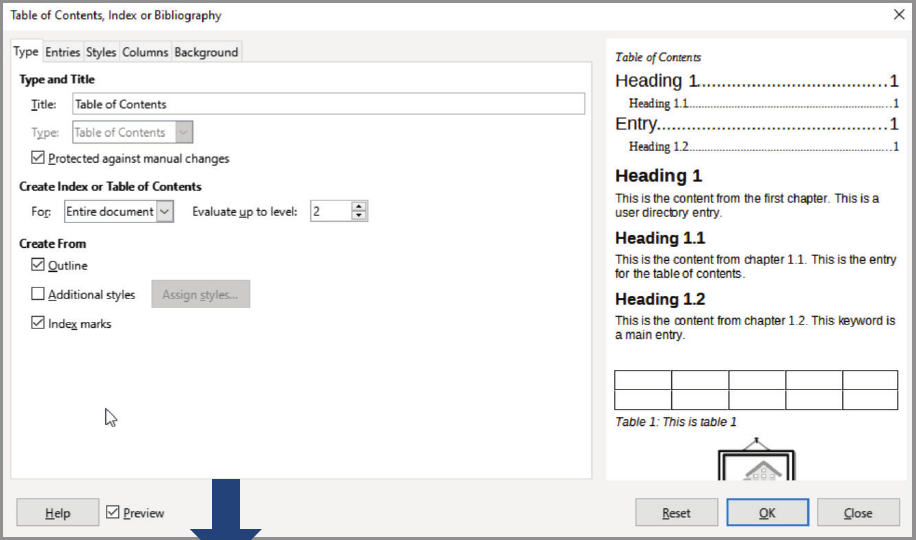
Apply suitable heading styles to the three section headings. Insert an automatic table of contents. Rename Next Steps to Our Next Steps, then update the contents.
Compare with a worked answer
The contents is generated from the heading hierarchy and shows Our Next Steps after updating. Page numbers should match the current document. Manually typed entries are not a substitute for an automatic contents list.
- Automatic ToC
- Headings used
- Updated title
- Correct current page references
Review a change
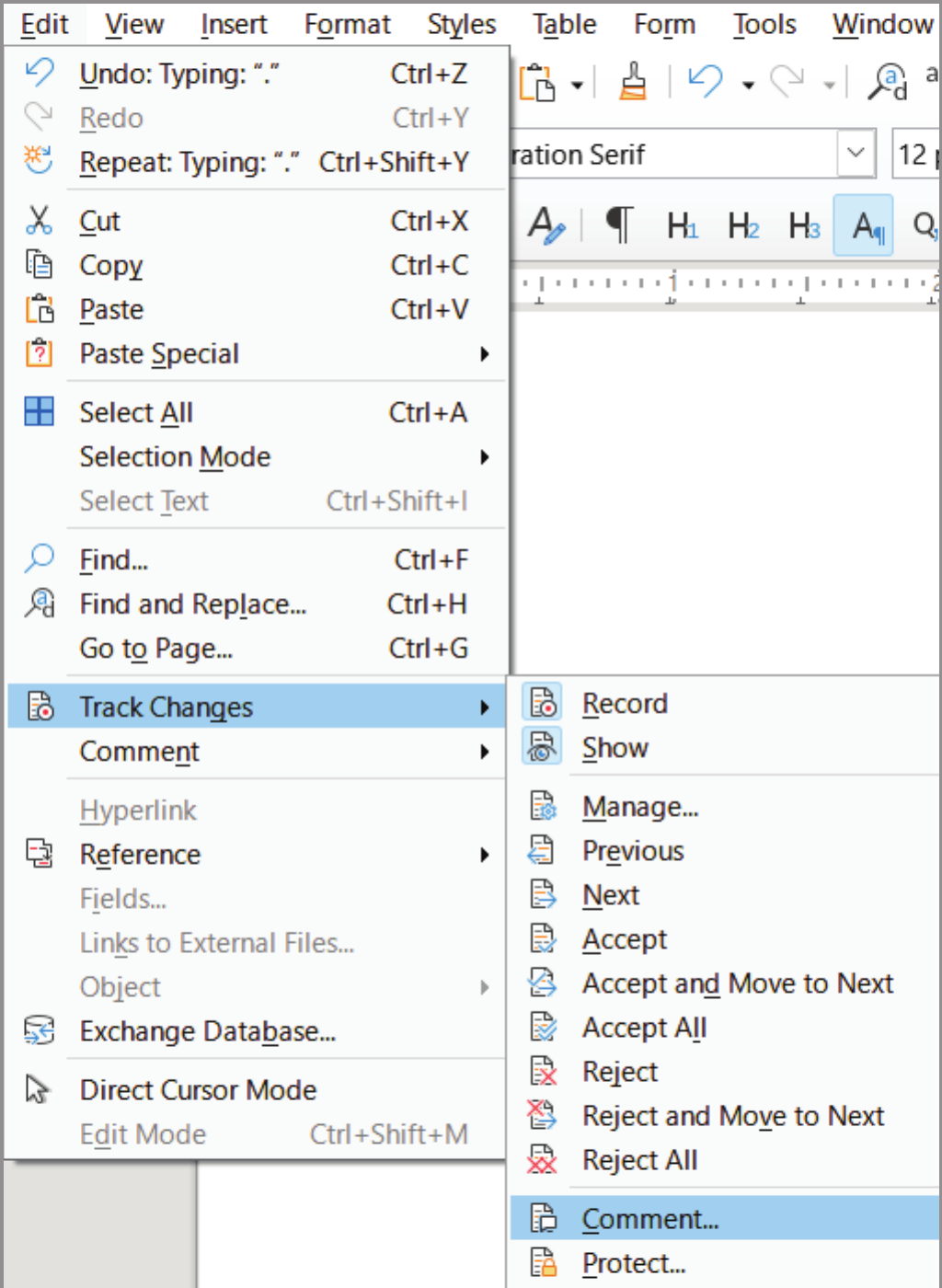
Record a change from “monthly meeting” to “weekly meeting”, add a comment asking whether the timing is feasible, then accept or reject the recorded change.
Compare with a worked answer
The proposed wording is visible in Track Changes until reviewed. A comment explains the question but does not itself change the text. Accept keeps weekly; reject restores monthly. Confirm the final wording and comment handling explicitly.
- Recorded edit
- Relevant comment
- Accept/reject demonstrated
- Final wording verified
Five Calc investigations with exact outputs
Start with a fictional club budget. In columns A–D enter Item, Quantity, Unit Cost, Total. Use these rows: Notebooks, 4, 30; Pens, 10, 12; Folders, 5, 20. In D2 enter =B2*C2 and fill down to D4. The totals are 120, 120 and 100; =SUM(D2:D4) gives 340.
Save an editable .ods file. Keep quantities as numbers, not labels such as “4 books” in the numeric cells. Add units in headings and use appropriate number formatting. A cell that looks like a number but contains text can behave differently in calculations.
In the tasks, inspect formula inputs and expected outputs before using an analysis tool. A scenario compares saved sets of inputs. Goal Seek works backwards from a target formula value by changing one input. A subtotal summarises groups, so the group field must be arranged appropriately.
For a macro, practise on a copy with known, safe actions. Record a simple formatting sequence and test it on another suitable range. Save macro-enabled work only as instructed in your lab and never enable an unknown macro just to complete an exercise.
Apply it. Explain it.
Consolidate two branch totals
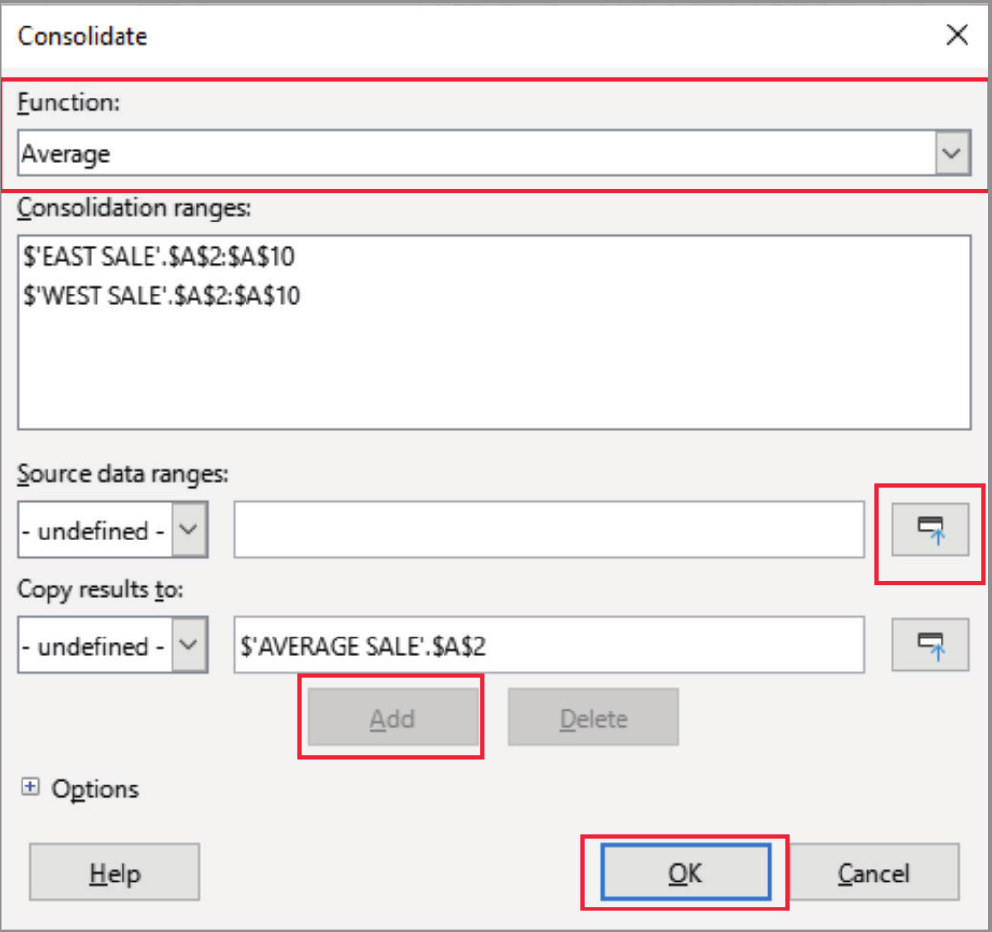
Branch A has Notebooks 120 and Pens 80. Branch B has Notebooks 90 and Pens 60. Consolidate by matching row labels using Sum.
Compare with a worked answer
Notebooks total 210 and Pens total 140; grand total 350. Label-based consolidation should match the item labels rather than depend on their positions. Verify 120 + 90 and 80 + 60 separately.
- Correct source ranges/labels
- Sum selected
- 210/140 outputs
- Independent total 350 check
Find category subtotals
Rows are Stationery 20, Stationery 30, Travel 50, Travel 70. Group by Category and sum Amount.
Compare with a worked answer
With categories grouped/sorted, the subtotals are Stationery 50 and Travel 120, with grand total 170. The grouping field is Category and the summed field is Amount.
- Grouped category data
- Correct grouping/function
- 50 and 120
- Grand total 170
Compare scenarios
Use Revenue=Price×Quantity. Save a Base scenario with Price 50 and Quantity 40, and a Festival scenario with Price 45 and Quantity 60.
Compare with a worked answer
Base revenue is 2000; Festival revenue is 2700. The scenario input range includes both Price and Quantity. Switching saved scenarios changes those inputs, and the formula recalculates.
- Input range includes both variables
- Two scenarios saved
- 2000 and 2700 outputs
- Formula retained and recalculates
Work backwards with Goal Seek
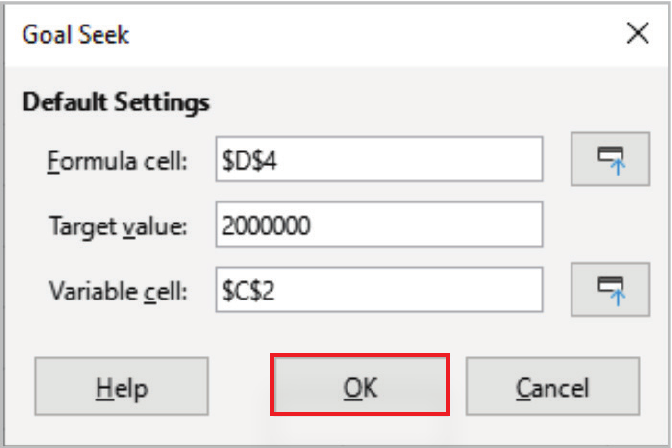
Use Profit=(Price−UnitCost)×Quantity−FixedCost with Price 50, UnitCost 20 and FixedCost 600. Find Quantity for Profit 3000.
Compare with a worked answer
Set the Profit formula cell to 3000 by changing Quantity. Since (50 − 20)q − 600 = 3000, 30q = 3600 and q = 120. Verify by substitution: 30 × 120 − 600 = 3000.
- Formula/target selected
- Quantity is variable cell
- 120
- Substitution check
Record and test a safe macro
On a practice sheet, record a macro that formats a chosen heading row in bold with a background colour. Name it FormatHeading and test it on a copy.
Compare with a worked answer
The recorded macro repeats the intended supported formatting actions. Inspect whether the recorded range is fixed; do not assume every recording follows a newly selected range. Confirm the intended row changed and other data did not. Explain the storage location and why unknown macros must not be enabled.
- Supported actions recorded
- Meaningful name/storage
- Test correct range/result
- Data preserved/security explained
Five Base tasks using one tiny library
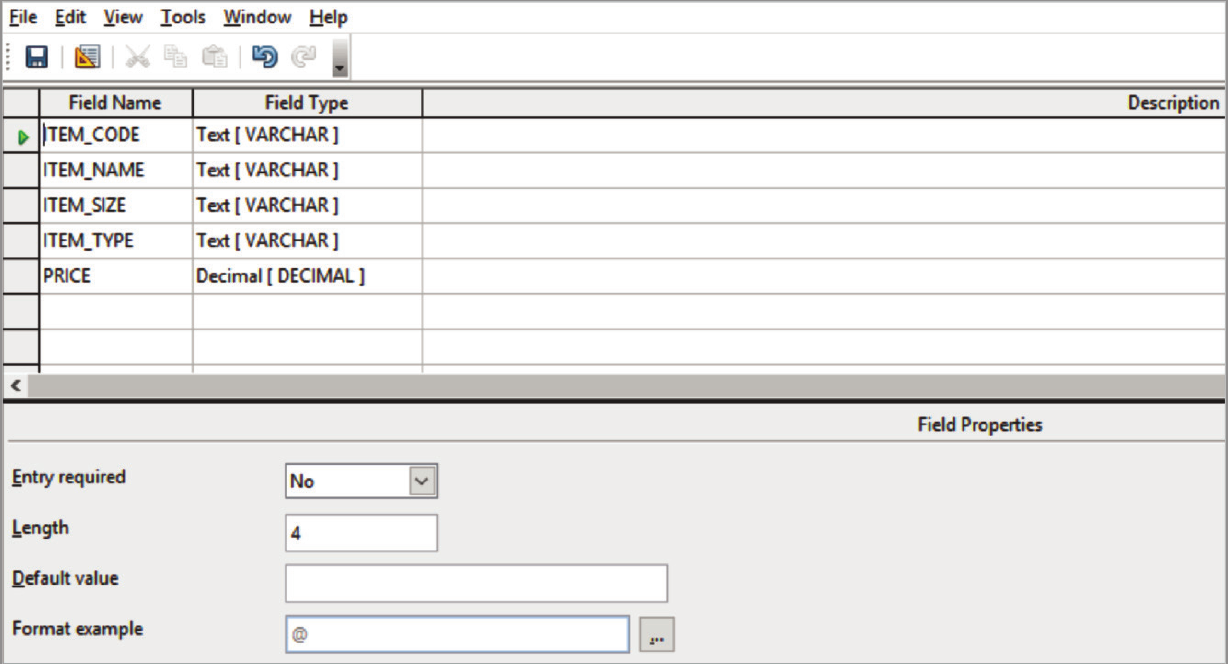
Use a fictional library database with two tables. Books has BookID (Integer, primary key), Title (Text) and Price (Decimal). Enter: 101, Atlas, 250; 102, Stories, 180; 103, Science, 320. Loans has LoanID (Integer, primary key), BookID (Integer, foreign key) and Returned (Yes/No). Enter loans 1 → 101, No; 2 → 103, Yes; 3 → 101, No.
BookID identifies a book record; it is not a page number or row position. Loans can repeat BookID because the same book can be borrowed on different occasions. LoanID uniquely identifies each loan. With referential integrity, a loan should not refer to a BookID missing from Books.
The tasks move from structure to output: create tables, enter data, relate tables, query records, then use a form and report. Keep the records small enough to check by hand. A query showing books priced above 200 should return Atlas and Science, not Stories.
Use the actual field types and saved objects in your database. A form is an interface for entering or viewing records; a report presents formatted output. Neither replaces the underlying table. Reopen the database and inspect the stored values before taking evidence for the portfolio.
Apply it. Explain it.
Design and populate Books
Use Books fields BookID (Integer), Title (Text) and Price (a suitable decimal numeric type).
| BookID | Title | Price (₹) |
|---|---|---|
| 101 | Atlas | 250 |
| 102 | Stories | 180 |
| 103 | Science | 320 |
Create Books with these fields and three records. Set BookID as the primary key and test that a duplicate key is rejected.
Compare with a worked answer
BookID is an integer unique key; Title is text; Price supports decimal numeric values. Three records contain 101/Atlas/250, 102/Stories/180, 103/Science/320. A duplicate BookID should not be accepted.
- Suitable field names/types
- Primary key
- Three accurate records
- Duplicate-key check
Relate Books and Loans
Use Books fields BookID (Integer), Title (Text) and Price (a suitable decimal numeric type).
| BookID | Title | Price (₹) |
|---|---|---|
| 101 | Atlas | 250 |
| 102 | Stories | 180 |
| 103 | Science | 320 |
Use Loans fields LoanID (Integer, primary key), BookID (Integer) and Returned (Yes/No). Starting loan records are 1, 101, No; 2, 103, Yes; and 3, 101, No.
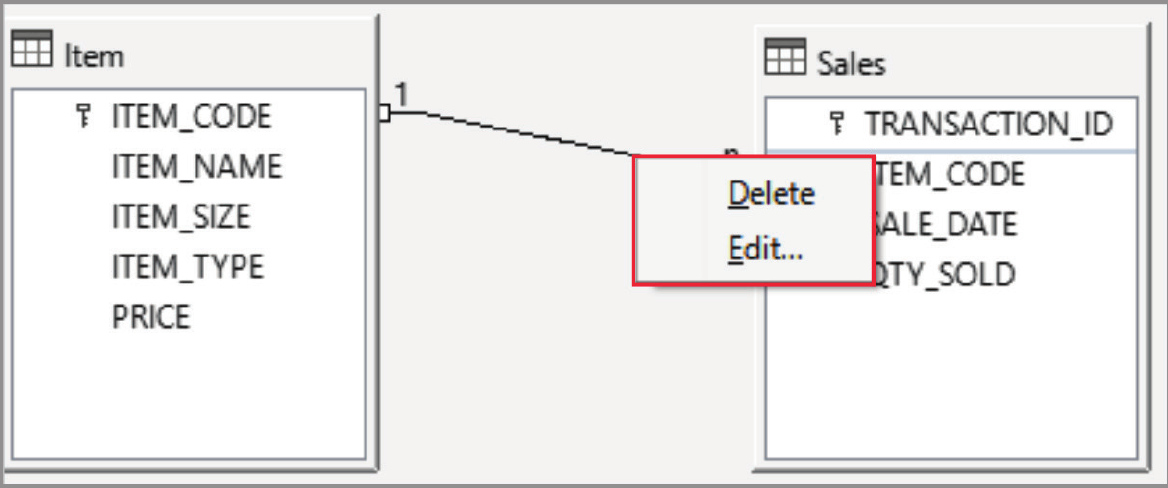
Set Books.BookID as its primary key. Create Loans, then relate Books.BookID to Loans.BookID and enforce referential integrity. Predict what happens to a new loan referring to BookID 999, which is absent from Books.
Compare with a worked answer
The relationship is one Books record to many Loans records. BookID 999 does not exist in Books, so referential integrity rejects the invalid reference. Do not add a fictitious book merely to hide the error.
- Loans structure/key
- Matching linked types
- One-to-many relationship
- Invalid reference rejected
Query a price condition
Use Books fields BookID (Integer), Title (Text) and Price (a suitable decimal numeric type).
| BookID | Title | Price (₹) |
|---|---|---|
| 101 | Atlas | 250 |
| 102 | Stories | 180 |
| 103 | Science | 320 |
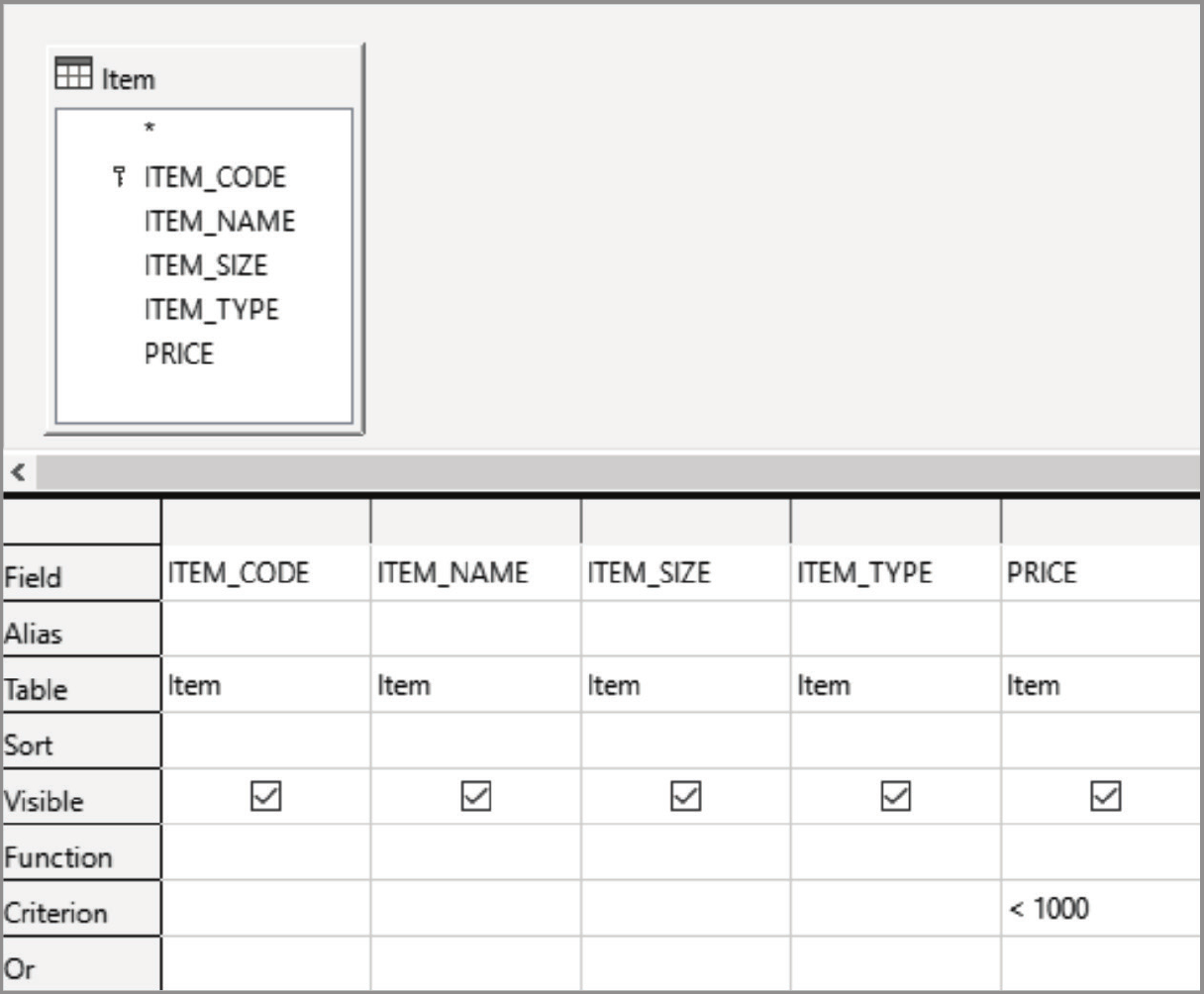
Display Title and Price for Books where Price is greater than 200, ordered by Price descending.
Compare with a worked answer
The rows are Science 320, then Atlas 250. Stories 180 is excluded. In the query design, use the Price field for the numeric condition and descending sort; show the requested output fields.
- Title/Price selected
- Price>200 condition
- Descending sort
- Correct two-row output
Enter through a form
Use Books fields BookID (Integer), Title (Text) and Price (a suitable decimal numeric type).
| BookID | Title | Price (₹) |
|---|---|---|
| 101 | Atlas | 250 |
| 102 | Stories | 180 |
| 103 | Science | 320 |
Books uses BookID as its primary key. Create a Books form and add the new record 104, Poems, 150 through it. Verify the saved record in the table.
Compare with a worked answer
The form is bound to Books and presents appropriate controls. After saving the new record, Books contains 104/Poems/150. The form is an input/view interface; the data is stored in the underlying table.
- Correct table source
- Usable controls
- Accurate new record
- Verified underlying table
Present a report
Use Books with BookID (Integer, primary key), Title (Text) and Price (decimal numeric). The four records are 101, Atlas, 250; 102, Stories, 180; 103, Science, 320; and 104, Poems, 150.
Create a report listing BookID, Title and Price, sorted by Title. Use a clear report title and readable column labels.
Compare with a worked answer
With all four books, the alphabetical order is Atlas, Poems, Science, Stories. The report displays the requested fields and accurate prices. Check whether the chosen report is static or dynamic so you know how later data changes affect it.
- Correct report source/fields
- Alphabetical order
- Readable title/labels
- Accurate data/update behaviour
Connect the tools in one case study
The current practical guidance calls for an interdisciplinary case study using Base forms for inputs, Base reports for outputs and Writer for documentation. Choose a manageable problem that genuinely benefits from organised records: a fictional library, equipment checkout or a small inventory.
Start with the questions the system should answer. “Which items are overdue?” requires more than a list of titles; it needs appropriate records and fields. Plan the tables, keys and relationships before entering data. Use a few fictional records to test normal and invalid cases.
- Define the purpose: who uses the system and what task it supports.
- Design: list fields, suitable types, keys and relationships.
- Input: build a clear form and enter test records.
- Output: query relevant records and present a readable report.
- Document: in Writer explain the problem, design, steps, tests and result, with useful labelled screenshots.
A good test includes an expected result. For example, an invalid foreign key should be rejected when referential integrity is enforced. Record what actually happened and correct the design if necessary. Do not claim a test passed merely because a screenshot looks tidy.
Your final explanation should say why each application was used. Calc can support optional budgets or analysis, but it does not replace the required Base input/report work in this case-study route.
Apply it. Explain it.
Write a test with an expected result
Books contains BookID values 101, 102 and 103. Loans uses a unique LoanID and a BookID foreign key to Books.BookID, with referential integrity enforced.
Propose one valid new-loan test and one invalid new-loan test. For each, specify the test input and expected result. Assume all other required fields are valid.
Compare with a worked answer
Valid: add a new loan with a unique LoanID and BookID 101; it should save if other required fields are valid. Invalid: add a loan with BookID 999 when that book is absent and referential integrity is enforced; it should be rejected.
- Valid test input
- Valid expected result
- Invalid test input
- Invalid expected result
Practise explaining and observing
In a viva, explain what you did and why. Use a short pattern: purpose → method → check. “I used a primary key to identify each book uniquely; I set BookID as the key; I tested that a duplicate was rejected” is stronger than reciting a definition without connecting it to your work.
Try these prompts aloud: Why use a paragraph style? How does a scenario differ from Goal Seek? Why is Price numeric? What does referential integrity prevent? What happens to the report if data changes? If you do not know a menu label, describe the operation accurately and demonstrate where it is in your version.
The syllabus also includes school-organised workplace visits. Observe the approved aspects: data-entry hardware/software, workspace layout, assistive technology, staffing, workflow and how operations are managed. The curriculum specifies at least three visits during the year; follow the school’s arrangements rather than visiting an unfamiliar workplace independently.
Prepare questions, record only information the host permits, and distinguish observed facts from estimates. Ask before photographing screens or documents. Never copy customer, employee or learner records into a public assignment. Where a business does not disclose income or costs, record “not provided” rather than invent a figure.
Finish the portfolio with a simple index: task title, file name, skill demonstrated, expected result and checking note. Explain one correction you made. Being able to diagnose and correct an error is part of learning the application.
Apply it. Explain it.
Explain a key
A fictional Books table uses an assigned, unique BookID for each record and a Title field that may repeat across different books.
In two sentences, explain why BookID is a better primary key than Title.
Compare with a worked answer
BookID is designed to be unique for each book record. Titles can repeat, so Title alone is not a reliable unique identifier.
- Uniqueness purpose
- Title can repeat
Report honestly
A workplace does not disclose its monthly income. What should a visit report record, and what should it avoid?
Compare with a worked answer
Record that the information was not provided or was outside the permitted scope. Do not invent an income or publish private business information without permission.
- Accurate unavailable/notprovided note
- No invented/private disclosure
Bring the ideas together
Explain one idea without looking, repeat one useful procedure, then revisit a question that made you pause.