
CBSE Class 10 · Information Technology 402 · 2026–27
A trailing cable, a blocked exit and an uncomfortable screen height are three different problems. Learn to spot the hazard, choose a suitable control and explain what you would do next.
- Distinguish health, safety and security.
- Recognise and report common workplace hazards.
- Improve a workstation and routine.
- Respond to an emergency within your training and responsibility.
Spot the hazard before someone is hurt
Health concerns physical and mental well-being. Safety concerns preventing injury and accidental harm. Security protects people, equipment and information against unauthorised access or deliberate harm. A comfortable chair, a clear escape route and a locked records cupboard serve different purposes.
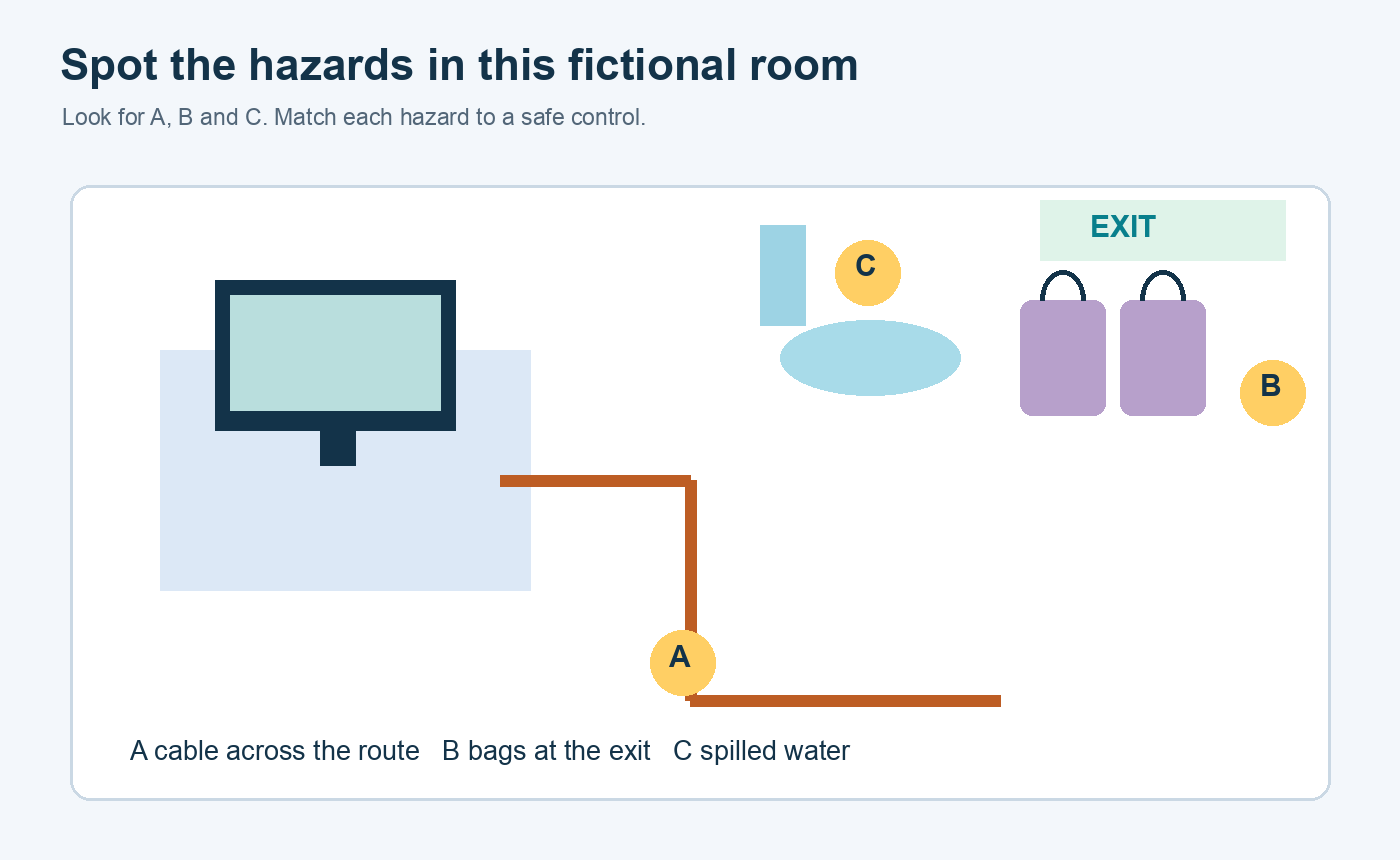
A hazard is something with the potential to cause harm. Risk concerns how likely that harm is and how serious it could be. A cable stretched across a busy walkway is a trip hazard; the risk depends partly on traffic, visibility and the likely consequences of a fall.
- Physical/fall hazards: wet floors, clutter, sharp edges and unstable stacks.
- Electrical hazards: damaged insulation, overloaded sockets and liquids near powered equipment.
- Fire hazards: combustible material near heat or faulty equipment.
- Health hazards: poor posture, unsuitable lighting, poor air quality or excessive repetitive work.
Use a simple cycle: identify the hazard, consider who could be harmed, choose a control, report/record it and check that the control works. Removing an unnecessary trailing cable is better than merely expecting everyone to step over it. A warning sign can help temporarily but does not remove the cause.
Workplace policies set responsibilities, safe procedures, access rules and reporting routes. Follow the procedure and tell the responsible adult or supervisor about defects. Do not repair electrical equipment or move heavy items just to finish a checklist.
Pause. Think. Try.
Choose your answer, then check the explanation.
Apply it. Explain it.
Compare with a worked answer
A blocked exit can delay evacuation: keep bags in the designated storage area and ensure the route is clear. A damaged lead can cause electrical harm or fire: stop using the affected equipment, keep people away and report it for qualified attention; do not handle exposed conductors.
- Blocked exit identified
- Clear designated escape route
- Damaged electrical lead identified
- Stop use/report rather than attempt repair
Handle equipment and information responsibly
Safe work begins before switching on. Check that the workspace is dry, equipment appears undamaged and cables do not cross walking routes. Use equipment only as instructed and report unusual heat, burning smells, sparks or damage immediately. Do not overload sockets or join extensions casually.
Keep drinks away from powered equipment. Do not pull a plug out by its cable, open power supplies, insert objects into sockets or try to rescue a damaged device while it is energised. Electrical isolation and repairs belong to an authorised competent person.
Moving equipment adds another risk. Check the load and route before lifting. Use suitable assistance or handling equipment for heavy or awkward objects; do not carry a stack that blocks your view. Store heavy items securely at a suitable level and close drawers after use. A simple planning step can prevent a moving-object, trip or fall incident.
Security has a practical routine too: lock the screen when stepping away, keep access credentials private and use only approved removable media and downloads. A visitor should follow the organisation’s access procedure rather than be given another person’s login. Protect confidential papers from casual viewing and use the approved disposal route.
Case method: state the hazard, the immediate safe response and who should take the next action. “Fix the wire” is not a suitable answer for an untrained learner; “stop using the equipment and report the damaged wire” respects responsibility.
Pause. Think. Try.
Choose your answer, then check the explanation.
Apply it. Explain it.
Compare with a worked answer
Stop and plan the move. Have an authorised person shut down and disconnect equipment safely. Assess the load and arrange suitable help. Clear the route and avoid carrying a load that blocks visibility.
- Stop/plan
- Safe shutdown/disconnection within authority
- Suitable help/load assessment
- Clear route/visibility
Fit the workstation to the person
Ergonomics fits work and equipment to the person. An awkward position repeated for a long time can contribute to discomfort and strain. Adjusting one part may require adjusting another: raising a chair can help the keyboard position but may leave the feet unsupported.
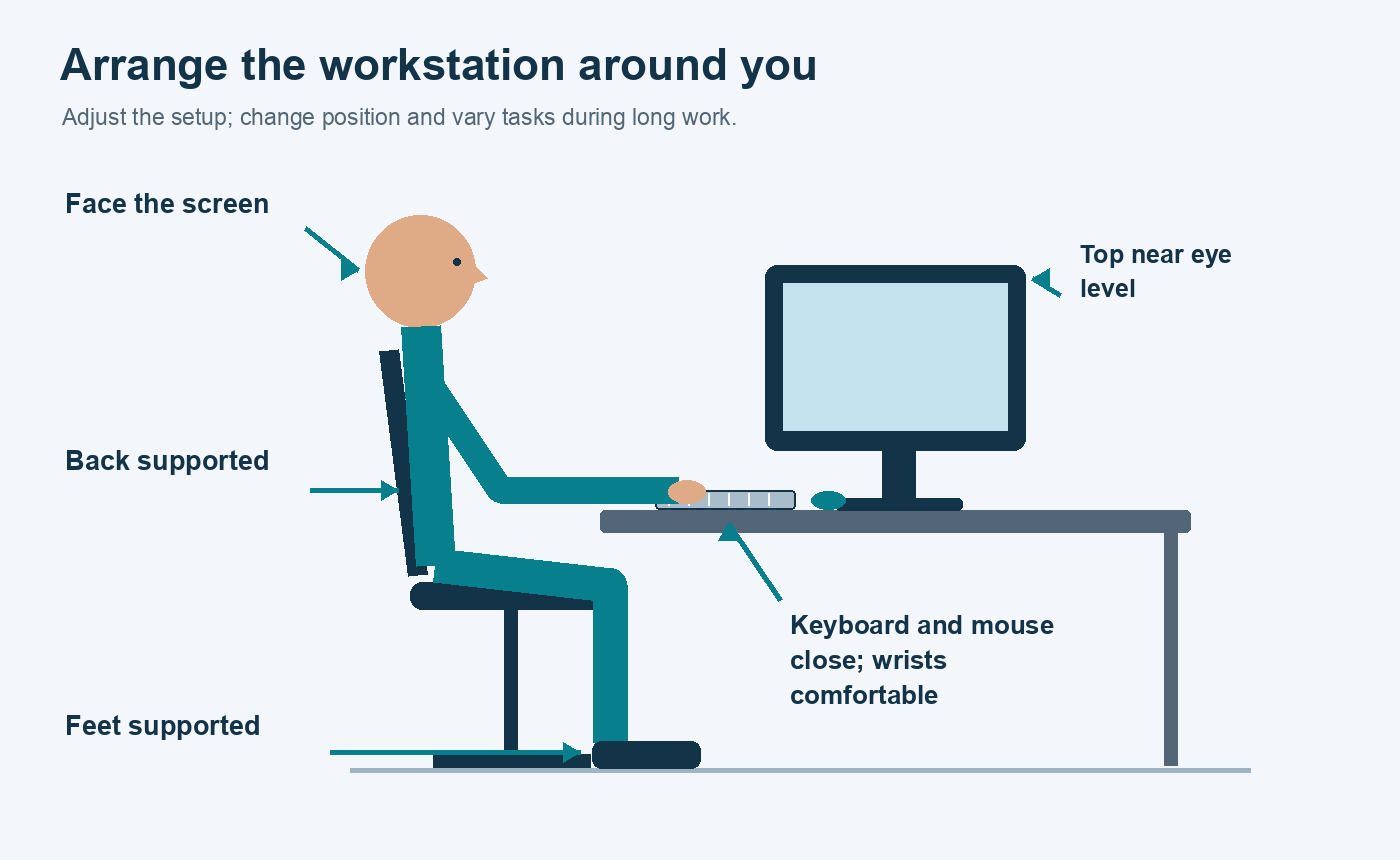
Use this visual check: support the back; keep feet supported on the floor or a suitable footrest; keep shoulders relaxed, elbows near the body and wrists in a comfortable neutral position. Place the keyboard and mouse close enough to avoid reaching. Face the monitor without twisting, with its top around or just below eye level and text large enough to read comfortably. Reduce reflections and glare rather than leaning forward to see.
Vary tasks, change position and take suitable breaks from prolonged screen work. Look away from close work periodically. Do not treat one posture as a reason to remain motionless all day. Report persistent discomfort and ask for a suitable adjustment.
Compare two setups: in A, the screen is far to the side and the mouse is beyond reach. In B, both are placed in front and close to the user. Setup B reduces twisting and overreaching. In an exam answer, connect each adjustment to the problem it reduces.
Recognise the pattern of a problem. Repeated movements and sustained awkward positions can contribute to occupational overuse symptoms in muscles and joints. A laptop places its screen and keyboard close together, so prolonged use may encourage a bent neck or an awkward arm position; ask for an approved setup suited to the task, such as a separate keyboard or display where available. Small text and glare can contribute to eye discomfort. Long work sessions can also crowd out movement and sleep, while excessive workload can add stress. Adjust the work, allow movement and rest, and report persistent symptoms to a responsible adult rather than trying to diagnose them yourself.
Check posture, keyboard/mouse location, display, lighting, available legroom and task duration as one system. A comfortable setup should accommodate the actual user, including any accessibility needs.
Pause. Think. Try.
Choose your answer, then check the explanation.
Apply it. Explain it.
Compare with a worked answer
Increase readable text size and set a comfortable viewing distance. Place the monitor in front. Bring the mouse close. Vary tasks and take suitable breaks from prolonged screen use.
- Readable display/viewing adjustment
- Monitor in front
- Mouse within reach
- Suitable breaks/task variation
Keep the whole workspace healthy
A healthy workplace is more than a tidy desk. Air, water, light, noise, cleanliness and work routines all affect the people using it. A quality checklist turns a vague instruction such as “keep the room healthy” into things that can be observed and reported.
- Air: keep required ventilation clear, prevent dust build-up and report persistent stuffiness, unusual odours or smoke. Do not block vents with books.
- Water: use the designated safe drinking-water supply and report leaks or suspected contamination. Clear-looking water alone is not proof of safety.
- Cleanliness: place waste in suitable bins, keep walking routes dry and clear, and follow cleaning procedures for shared surfaces.
- Lighting and noise: adjust avoidable glare and disruptive noise through the approved arrangements.
Where a problem needs technical assessment, report it instead of improvising a test. A learner should not taste suspect water or open an electrical ventilation unit. Record the location, time and observed problem accurately; a useful report separates observation from assumption.
Checklist example: “Exit clear: yes/no; if no, action and person notified.” Add a date for the check and verify that a reported issue has been resolved. Ticking a box is evidence only when the condition was actually checked.
Monitor, act, check again. A quality-monitoring process has a sequence: identify what needs checking; arrange the appropriate observation, measurement or approved sample test; record the date, location and result; compare it with the applicable requirement; report a problem and arrange corrective action; then recheck. For example, a reported water-quality concern is passed to the responsible staff for approved sampling and testing, not judged by colour alone. Air-quality checks may require suitable instruments and competent staff as well as observations about ventilation and dust. Learners can record and report; authorised staff arrange technical tests and decide the response.
Good routines include regular cleaning, appropriate maintenance, safe storage and attention to the needs of all users. They help prevent problems instead of waiting for an incident.
Pause. Think. Try.
Choose your answer, then check the explanation.
Apply it. Explain it.
Compare with a worked answer
Examples: clear exits/walkways; suitable ventilation; a dry floor without leaks; safe equipment/cables; appropriate workstation setup; clean surfaces; approved drinking-water arrangements. Any four relevant observable items are acceptable.
- First relevant observable item
- Second distinct item
- Third distinct item
- Fourth distinct item
Respond calmly and get the right help
An accident is an unplanned event that may cause injury or damage. An emergency needs prompt action because people, property or the environment may be in immediate danger. Preparing before an event matters: know the alarm, escape routes, assembly point and reporting procedure.
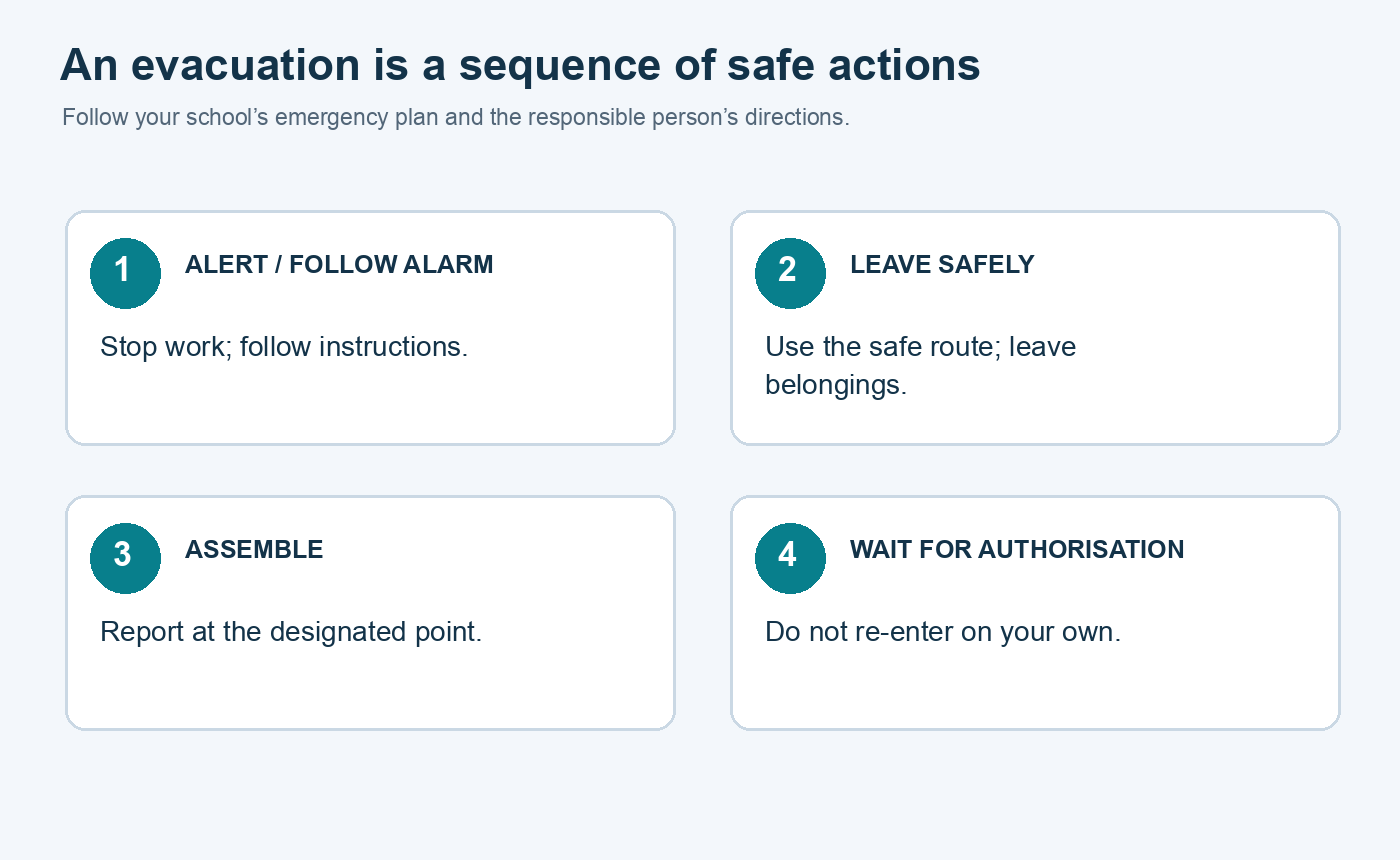
If an alarm or responsible person directs evacuation, stop work and follow the established safe route. Leave belongings, do not delay to finish a task, and do not use an ordinary lift during a fire evacuation. Go to the assembly point, report your presence and do not re-enter until authorised. Never enter smoke to retrieve a device or search alone.
Fire prevention includes keeping escape routes clear, separating combustible material from ignition sources and reporting damaged electrical equipment. The fire triangle is fuel, heat and oxygen; removing a required element can stop combustion, but choosing or using firefighting equipment is for trained, authorised people following the emergency plan. A student should raise the alarm and leave danger, not test a fire-extinguisher technique.
For electrical incidents, do not touch a person or object that may still be connected to live electricity. Keep clear, summon an authorised adult/emergency help and have the supply isolated safely by a competent person. Get a trained first aider; follow emergency-service instructions and act only within your training. Do not give medicines or attempt an untrained rescue.
In India, 112 is the integrated emergency number. Give the exact location, nature of the emergency, hazards and people needing help, then follow the operator’s instructions. Routine classroom practice should be a role-play, never a test call to an emergency service.
Pause. Think. Try.
Choose your answer, then check the explanation.
Apply it. Explain it.
Compare with a worked answer
Follow the school emergency instructions and safe designated route. Leave belongings and do not delay. Go to the assembly point and report presence. Remain there and do not re-enter until authorised.
- Follow safe route/instructions
- Leave belongings/no delay
- Assembly point/accounting
- No re-entry without authority
Bring the ideas together
Explain one idea without looking, repeat one useful procedure, then revisit a question that made you pause.