
CBSE Class 10 · Information Technology 402 · 2026–27
A useful IT project needs more than a computer. You must explain a choice, organise your work, protect files and make decisions that serve people. Try these everyday situations before you memorise the terms.
- Choose a communication method and improve a message.
- Plan and complete a task independently.
- Organise and protect digital work.
- Evaluate a small business idea and a sustainable solution.
Choose the channel, then close the loop
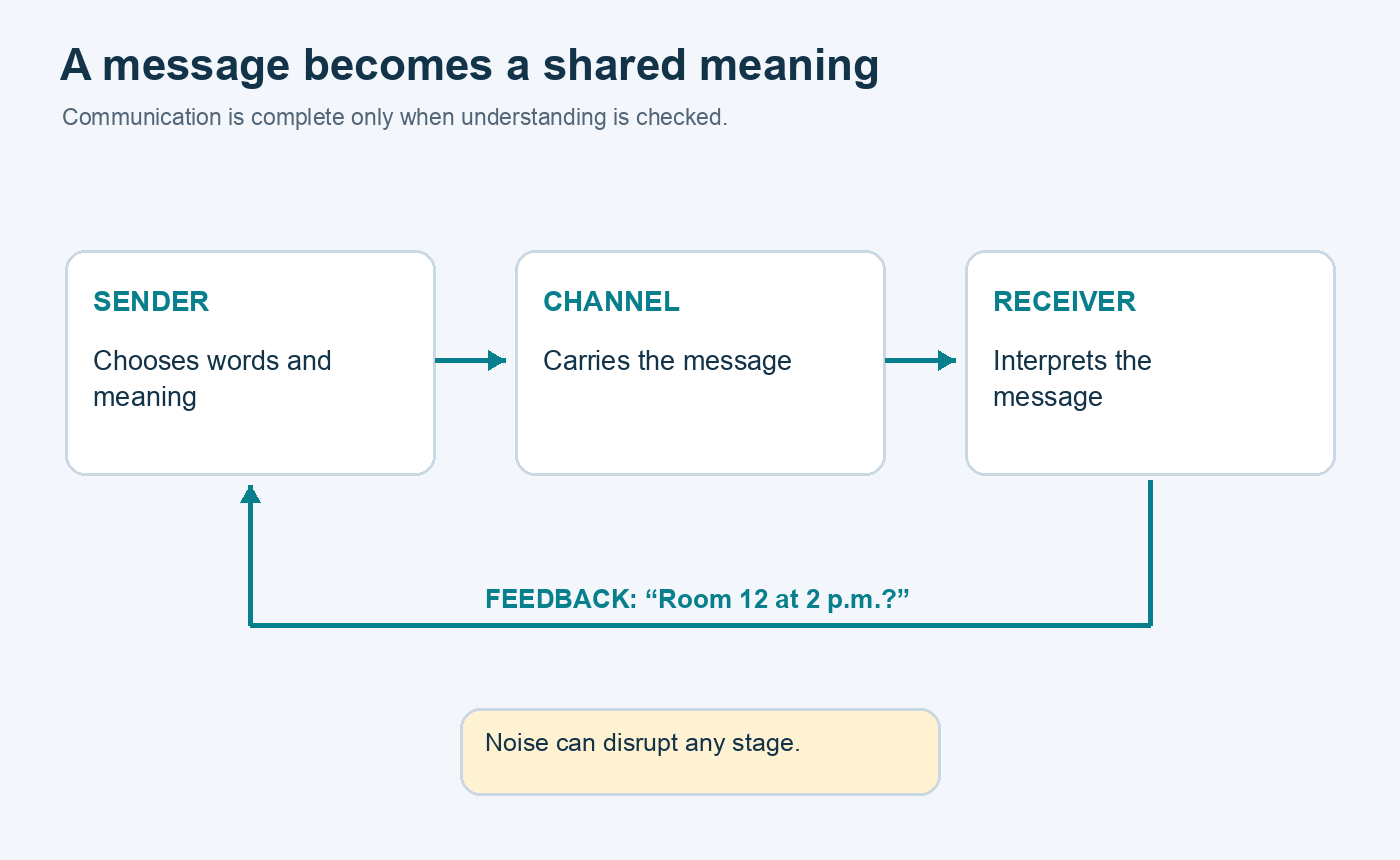
Your group changes its presentation room. A whispered message reaches one person; a written notice reaches everyone who checks the board. Communication succeeds when meaning reaches the receiver and the sender can check understanding.
The sender encodes an idea into a message, sends it through a channel, and the receiver decodes it. The receiver’s response is feedback. Noise can interrupt any part: a loud corridor, an unclear word or a distracted reader.
- Verbal: spoken or written words. A written email is verbal communication too.
- Non-verbal: facial expression, posture, gestures and tone-related signals. Avoid pointing aggressively, turning away or assuming that one gesture means the same thing to everyone.
- Visual: a map, chart, icon or diagram. Combine a room map with a written room number when the route matters.
Choose by audience, urgency, complexity and the need for a record. For an urgent room change, tell the group directly and post a clear written update. Ask one person to repeat the new room and time. That response closes the loop.
Specific feedback: “The chart has a title, but the vertical axis needs a unit.” Non-specific feedback: “Not good.” Descriptive feedback points to observable work and a useful next step; receive it by listening, clarifying and deciding what to improve.
Pause. Think. Try.
Choose your answer, then check the explanation.
Apply it. Explain it.
Compare with a worked answer
Name the exact room/location and state the precise time. A date, audience and sender/contact may also help.
- Exact location
- Precise time or another justified missing detail
Remove barriers with the 7 Cs
A message can be accurate and still fail to reach its audience. Identify the barrier before choosing a remedy. A noisy fan is a physical barrier; unfamiliar technical vocabulary is a language barrier. Worry or assumptions can create interpersonal or psychological barriers. Cultural differences can change how a gesture is understood. A complicated reporting chain is an organisational barrier.
Match the response: move to a quieter place, use familiar words, provide a translation where needed, listen without interrupting, ask for clarification, or choose an accessible written/visual format. Speaking louder does not solve an unfamiliar-language problem.
Use the 7 Cs as an editing checklist: clear (one understandable purpose), concise (necessary words), concrete (specific details), correct (accurate facts and language), coherent (logical order), complete (enough information to act), and courteous (respectful).
Compare “Send the thing soon” with “Please upload the two-page report to the class folder by 4 p.m. on Friday.” The second message names the action, item, destination and deadline. Concise does not mean deleting essential details. A complete message can still be short.
Try it: read a partner’s instruction without using your own background knowledge. Underline anything you would need to ask before acting. Then revise those gaps and ask the partner to explain the instruction back.
Pause. Think. Try.
Choose your answer, then check the explanation.
Apply it. Explain it.
Compare with a worked answer
Example: loud background noise prevents hearing; move the discussion to a quieter place. Other matched barrier/remedy pairs are valid.
- Identifies a physical barrier
- Gives a remedy that addresses it
Build a sentence, then a paragraph
A useful sentence expresses a complete idea. “The students saved the file” has a subject (the students) and a predicate (saved the file). “After the lesson” is a phrase here, not a complete sentence. Join it to a complete thought: “After the lesson, the students saved the file.”
Words do different jobs. A noun names something (file); a pronoun replaces a noun (it); a verb expresses action or state (saved, is); an adjective describes a noun (clear); an adverb modifies a verb/adjective/adverb (carefully); a preposition relates words (in); a conjunction connects (and); an interjection expresses a sudden feeling (oh!).
Use a before a consonant sound, an before a vowel sound and the for a particular known item: “an hour”, “a useful tool”, “the report we prepared”. Sound, not only the first written letter, decides a/an.
- Declarative: “The file is ready.”
- Interrogative: “Is the file ready?”
- Imperative: “Save the file.” The subject “you” is understood.
- Exclamatory: “What a clear diagram!”
A simple sentence has one independent clause. A compound sentence joins independent clauses: “I saved the file, and Riya checked it.” A complex sentence includes a dependent clause: “I checked the file before I sent it.”
A paragraph develops one main idea: a topic sentence, supporting details in a logical order, and a closing or linking sentence. For a project update, state the result, describe the evidence and name the next step. Check capital letters, agreement, punctuation and spelling before sending it.
Pause. Think. Try.
Choose your answer, then check the explanation.
Apply it. Explain it.
Compare with a worked answer
The survey table is complete. Please check its totals by tomorrow.
- Clear statement of completion
- Polite request with action and deadline
Recognise stress and plan a manageable response
Two tasks are due tomorrow, your files are scattered and you keep rereading the same line. Stress is the mental or physical response to pressure or demands. It may arise from workload, conflict, uncertainty, expectations or poor time planning. Recognising the source helps you choose an action instead of blaming yourself.
A little pressure may prompt preparation; prolonged or overwhelming stress can interfere with concentration, sleep and work. Notice your own early signs rather than assuming everyone reacts in the same way.
- Name the demand. “I have not divided the report into smaller tasks.”
- Choose one controllable step. List the remaining parts and start with a ten-minute task.
- Plan recovery. Use regular sleep, suitable physical activity, short breaks and time for enjoyable activities. Gentle breathing, yoga or meditation and a nature walk may help some people relax.
- Ask for support. Tell a trusted adult or teacher when pressure is persistent, affects daily life or feels unmanageable.
A holiday or break can support recovery, but postponing every task until the deadline creates new pressure. Pair rest with a realistic plan. Compare “I must finish everything perfectly tonight” with “I will complete the table, check it and ask about the unclear instruction.” The second statement gives you a first action.
When answering a case question, link a stress source to a suitable technique and explain how it helps. Merely listing “yoga, exercise” does not explain the choice.
Pause. Think. Try.
Choose your answer, then check the explanation.
Apply it. Explain it.
Compare with a worked answer
Divide revision into small scheduled sessions before the deadline. Include rest and regular sleep, checking progress each day rather than doing everything in one night.
- Earlier manageable revision plan
- Suitable recovery or progress-review habit
Work independently without working in isolation
Independent work means taking responsibility for planning, carrying out and checking a task without needing instructions at every step. It does not mean refusing help or hiding a problem. A capable learner asks a specific question after identifying what is unclear.
Self-awareness means recognising your strengths, interests and areas to improve. Self-motivation helps you begin and persist because you value the goal. Self-regulation means managing your attention, emotions and actions: for example, closing an unrelated tab until the work period ends.
- Internal self-awareness: recognise your own values, interests, strengths, limitations and feelings. For example, you notice that you enjoy checking numerical patterns but rush written explanations.
- External self-awareness: understand how other people experience your behaviour and work. Ask a partner for a specific observation, such as whether your instructions were easy to follow. Compare that feedback with your own view instead of treating every opinion as a fact.
Use both views: reflect on your work, seek relevant feedback, then choose one improvement you can practise. This links self-awareness to independent action.
Turn “get better at Calc” into a SMART goal: specific, measurable, achievable, realistic/relevant and time-bound. “By Friday, I will build a four-row budget with correct totals and check it against hand calculations” identifies a result and a deadline.
- Understand the task and the standard of success.
- Break it into steps; estimate time and collect tools.
- Prioritise important or urgent work and start.
- Monitor progress, solve reasonable problems and ask focused questions.
- Check the result and record one improvement for next time.
Example plan: 5 minutes to enter data, 8 to add formulas, 5 to check results and 2 to save a named final copy. If data entry takes longer, adjust the plan rather than deleting the checking step. Time management includes choosing what to do and reviewing how the time was used.
Pause. Think. Try.
Choose your answer, then check the explanation.
Apply it. Explain it.
Compare with a worked answer
Make a step-by-step plan and manage the time without continual directions. Check the finished document against the requirements and correct errors.
- Planning/time management
- Self-checking/correcting or justified focused help-seeking
Keep files organised and recoverable
An operating system manages hardware and provides services for applications, files and users. Windows and Ubuntu are examples. A graphical interface uses windows, icons, menus and a pointer; a command-line interface accepts typed commands. Systems can also be described by tasks and users: multitasking runs several tasks, while multi-user systems support separate users.
The desktop is a working screen; icons represent items or shortcuts, a taskbar or dock helps switch applications, and a file manager shows storage locations. An application window is not the file itself: closing a window before saving can lose unsaved changes.
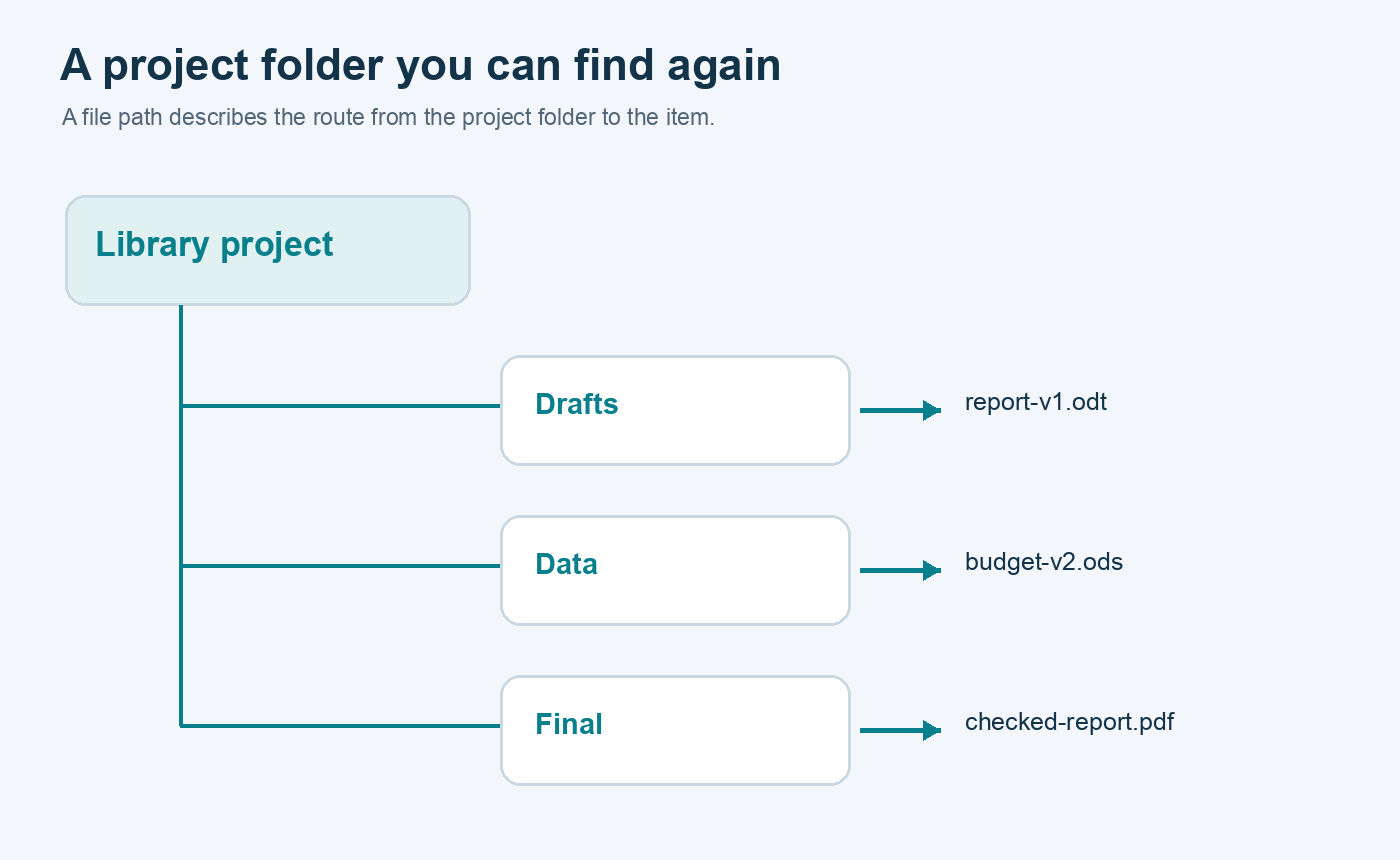
A file stores data. A folder/directory groups files and subfolders. A path describes where an item is located. Create a project folder with Drafts, Data and Final subfolders. Use meaningful names such as library-budget-v2.ods; changing a filename extension does not convert its actual format.
- Save: store changes in the current file. Save As: choose another name, location or format.
- Copy: retain the original and make another copy. Move: change the location.
- Rename: change the name while retaining the content.
- Delete: remove an item; a local deletion may go to a recycle bin/trash, but not every deletion is recoverable.
- Restore: recover a retained trash item or a suitable backup.
Before deleting a folder, inspect its contents and check that a usable backup exists. A shortcut points to an item; copying only a shortcut is not a backup of the target file.
Pause. Think. Try.
Choose your answer, then check the explanation.
Apply it. Explain it.
Compare with a worked answer
Use meaningful filenames with clear version numbers or dates. Keep drafts and checked final files in named subfolders inside one project folder.
- Clear consistent filenames
- Logical folder structure
Protect the work as well as the machine
Computer care has two goals: keep equipment usable and keep information safe. Make a simple maintenance schedule with a task, frequency and responsible person. For example, check backups regularly, install approved updates, keep ventilation clear and report damaged equipment.
Shut down and isolate equipment as instructed before cleaning. Use a soft suitable cloth and the manufacturer’s guidance; never spray liquid directly into a keyboard, display or socket. Keep food, drinks, dust and heat away. Do not open electrical equipment yourself.
Malware is harmful software. A virus attaches to other files or programs; worms can spread across networks; a Trojan pretends to be legitimate; spyware secretly collects information. Use maintained security software, approved updates and trusted downloads. Scan suspicious files using the approved tool and follow quarantine/removal advice rather than experimenting with an unknown file.
Protect access with a strong unique password, keep it private and use additional verification where available. Lock or sign out of a shared computer. Do not share a one-time code, and check unexpected links or attachments before opening them. Back up important files to a separate approved location and test that the copy opens.
Remove unwanted temporary files using approved storage-cleanup tools after checking what they will remove. Do not delete unfamiliar system files. Updates, backups and antivirus serve different purposes: antivirus cannot restore a deleted assignment, and a backup does not prevent a weak password being guessed.
Pause. Think. Try.
Choose your answer, then check the explanation.
Apply it. Explain it.
Compare with a worked answer
Keep a verified backup in an approved separate location. Use your own protected account and lock/sign out after use; do not share passwords or verification codes.
- Backup/recovery measure
- Access-protection measure
Turn a need into a responsible business idea
An entrepreneur identifies an opportunity, organises resources and takes calculated risks to provide a product or service. A worker paid a wage by an employer is in wage employment; a person running their own enterprise is self-employed. Both routes can contribute useful skills to society.
Useful entrepreneurial qualities include initiative, creativity, confidence, perseverance, communication, decision-making and responsibility. The functions include finding a need, planning, arranging resources, organising work, managing risk and learning from customers. Enterprises can create employment, solve problems and contribute to economic development.
Test common myths. Entrepreneurs are not simply “born successful”; skills can be developed. A business does not always need a huge starting investment. Profit is not guaranteed, and taking a risk is not the same as acting without information. An idea succeeds only if it meets a need well enough to sustain its costs and responsibilities.
Fictional example: a repair-and-reuse service reduces discarded stationery. Before starting, find out what people need, what tools and skills are required, what safe work is possible, the expected costs and how customers would reach the service. If each approved repair costs ₹8 in materials and is priced at ₹12, the ₹4 difference is a contribution before other costs, not automatically final profit.
Make a short plan: customer need, product/service, resources, costs, price, promotion, risks and measures of success. Compare your strengths with what the task needs. Research a local entrepreneur using public information or an agreed interview; record actual answers instead of inventing their experience.
Pause. Think. Try.
Choose your answer, then check the explanation.
Apply it. Explain it.
Compare with a worked answer
Find out who the intended customers are and what they need. Estimate the resources and costs needed to provide the product or service safely.
- Customer need/demand
- Resources/costs or another relevant planning item
Make development last
Sustainable development meets present needs without undermining future generations’ ability to meet theirs. It connects environmental protection, social well-being and economic activity. A cheap solution that exhausts water or excludes part of a community may create new problems rather than solve the original one.
Look for local issues: wasted electricity, leaking taps, mixed waste, loss of vegetation or short-lived products. First describe the problem and its cause; then compare solutions and the resources they require. Reduce unnecessary use before relying only on recycling.
- Rainwater harvesting: collect suitable roof runoff for an appropriate use with maintenance and safe storage.
- Drip irrigation: deliver water near plant roots to reduce unnecessary loss where suitable.
- Composting: turn suitable biodegradable waste into compost with managed conditions.
- Solar energy: use sunlight for an appropriate energy need, considering cost, space and maintenance.
These are solutions to investigate, not automatic answers for every site. Respect local and indigenous knowledge, cultural heritage and community experience, while checking safety and evidence. Environmental citizenship includes taking responsibility for shared resources and considering how decisions affect other people.
Try a digital link: make a fictional table comparing weekly paper use before and after double-sided printing. Record the assumption, calculate the difference and explain what the figures do and do not show. A useful sustainability proposal includes a measurable action, a person responsible and a later check.
Pause. Think. Try.
Choose your answer, then check the explanation.
Apply it. Explain it.
Compare with a worked answer
Review drafts on screen before printing. When printing is needed, use double-sided printing or suitable reused paper, following school requirements.
- Reduce unnecessary printing
- Reduce paper used per necessary print or suitable reuse
Bring the ideas together
Explain one idea without looking, repeat one useful procedure, then revisit a question that made you pause.